The Smartphone as Your Personal AI Agent: Convenience, Permissions, Privacy, and the New Attack Surface

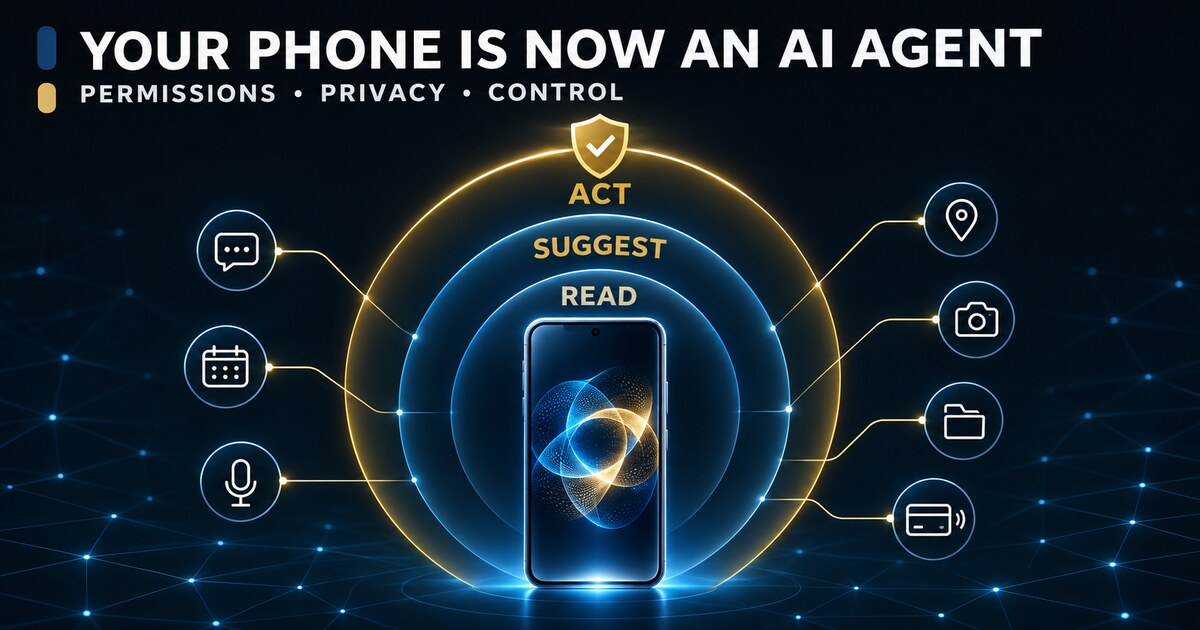
Your phone is no longer only a screen connected to services. It is becoming an actor that can observe context, make recommendations, and sometimes take action on your behalf.
What is changing
The smartphone is moving from an app launcher to a personal AI agent. New operating-system features can summarize messages, plan tasks, search across personal content, interpret images, translate conversations, and coordinate actions across applications. Some computation runs on the device; other requests cross into a vendor’s cloud.
The important shift is not the label “AI.” It is the transfer of judgment and execution from a person tapping a screen to software operating across identity, communications, location, contacts, payments, files, cameras, microphones, and calendars.
Why leaders and consumers should care
- Convenience becomes authority: an assistant that can draft a message is low risk; one that can send it, change a reservation, or approve a payment has a materially different trust boundary.
- Personal data becomes operational context: the value of an agent depends on access to sensitive patterns, not just isolated files.
- Security decisions move into defaults: permission prompts, confirmation rules, logging, and revocation determine whether automation is safe.
- Device lifecycle becomes governance: update support, repairability, local processing, and vendor exit affect the real value of an AI phone.
The technical reality beneath the feature list
Permissions are the agent’s capability system
Traditional mobile permissions usually answer whether an app can access a camera, contact list, location, or microphone. An agent adds a second question: what may the software do with that access, and can it act across another application?
A useful model separates read, suggest, and execute. Reading a calendar is not equivalent to creating an appointment. Summarizing a bank notification is not equivalent to initiating a transfer. The safest default is narrow read access, explicit user confirmation for external side effects, and a visible audit trail after every consequential action.
capability: calendar.create_event
principal: personal-agent
scope: user-owned-calendar
precondition: user-confirmation + current-screen-context
side_effect: external-notification
log: action + parameters + timestamp + result
revocation: device-settings + provider-console
On-device AI improves privacy, but does not make it automatic
Local inference can reduce the amount of raw content sent to a cloud service and can keep some tasks available without connectivity. It does not eliminate risk. A device may still synchronize prompts, telemetry, embeddings, crash data, or derived summaries. A local model can also leak information through its outputs if another app or account can query it.
When comparing devices, ask which functions are genuinely local, which are cloud-assisted, how long context is retained, whether data is used for training, and whether an administrator or family member can inspect or export the history.
The new attack surface is cross-application intent
Agentic workflows create opportunities for confused-deputy behavior: a malicious message, webpage, document, or notification may influence an agent that has more authority than the content source deserves. The key risk is not only prompt injection. It is an untrusted input reaching a trusted action.
Defenses include separating untrusted content from instructions, limiting tool scopes, requiring confirmation for money, identity, deletion, and external communication, and refusing to treat content retrieved from a third party as a policy update.
A practical buying and deployment framework
For consumers: score the phone beyond processor speed
- Update horizon: verify the promised security-update period and the vendor’s track record.
- Data boundary: identify local versus cloud features and the controls for history, training, and export.
- Permission quality: check whether access can be granted temporarily, per task, or only permanently.
- Action controls: confirm that payments, messages, account changes, deletion, and purchases require clear confirmation.
- Repair and exit: consider battery replacement, parts availability, account portability, and what happens when the vendor retires the service.
For technology leaders: treat the phone as an endpoint with an agent
Organizations should not allow consumer convenience to bypass enterprise controls. Establish a policy for managed versus personal devices, approved assistant features, data classification, mobile application management, incident response, and evidence retention. Test the agent with synthetic data before permitting access to corporate mail, documents, customer records, or financial workflows. For the infrastructure layer, pair this endpoint policy with explicit authentication and authorization controls for AI agents.
A simple control matrix helps:
- Low impact: summarize a user-selected document; local processing preferred.
- Moderate impact: create a draft or calendar event; confirmation and activity log required.
- High impact: send external messages, change access, move money, delete data, or make regulated decisions; separate approval, strong authentication, and post-action review required.
What a responsible agent experience should expose
- Why: the goal and source of the recommendation.
- What: the exact action and parameters before execution.
- Where: which device, account, model, and service will process the data.
- When: retention period and expiration of delegated authority.
- Undo: rollback, revocation, and support paths when the agent is wrong.
A 30-day validation sequence
- Days 1–7 — inventory: list assistants, data sources, permissions, connected accounts, update status, and cloud dependencies.
- Days 8–14 — constrain: disable unnecessary integrations, separate personal and work contexts, and require confirmation for side effects.
- Days 15–21 — test: use synthetic messages and documents to test prompt injection, accidental disclosure, wrong-recipient actions, and revocation.
- Days 22–30 — institutionalize: document approved uses, log review responsibilities, rehearse account recovery, and reassess after every major OS or model update.
What happens next
The smartphone will become the most intimate agent many people use, but adoption will not be decided by model benchmarks alone. Trust will depend on visible boundaries: local processing where practical, permission systems that express intent, confirmation for irreversible actions, durable updates, and a credible way to leave the platform.
Sources and further reading
- Android Developers: minimize permission requests — official guidance on scoped access, contextual requests, and graceful degradation.
- Apple Private Cloud Compute Security Guide — technical architecture for cloud-assisted AI privacy, attestation, and stateless processing.
- NIST AI Risk Management Framework — governance, measurement, and management practices for AI risk.
- OWASP Mobile Application Security Cheat Sheet — practical mobile controls for least privilege, data handling, and sensitive actions.
Frequently asked questions
Is an AI smartphone automatically more private?
No. On-device processing can reduce cloud exposure, but users must verify synchronization, telemetry, retention, and the services behind each feature.
What is the biggest new security risk?
Cross-application action: untrusted content influencing an agent that can read sensitive data or perform external side effects.
Should companies block personal AI assistants?
Not necessarily. A risk-based policy with managed devices, data boundaries, limited tools, confirmation, and logging is more useful than an untestable blanket rule.
What should buyers prioritize?
Security-update longevity, permission controls, clear local/cloud boundaries, repairability, account portability, and safe confirmation behavior—not only benchmark speed.